

Welcome!
Let us help you improve your search engine rankings,capture
traffic, monetize, and make your blog look awesome!

Link Roundup - 20 Essential Ways To Increase Blog Traffic

You don't want to miss this!

Getting Traffic 107 - The Mega SEO Resource Guide

Can you handle it?

Follow us on your favorite networking site!

Stay up to date with all the latest Blogging tips and tricks!

Building Your Blog 500 - Guest Posts On Your Blog

Are Guest Posts For You?

Showing posts with label hot shot blogger. Show all posts

Friday, November 16, 2012

Getting Traffic 304 - Twitter Rank

If you're trying to drive traffic to your site, Twitter is a great way to do it.  You can start a Twitter campaign and get your content out to the masses.  But how do you know what to tweet 10 times a day?  How do you know what kind of visibility your tweets are getting... aka how many people are your tweets reaching?

Well luckily for you I've just discovered another free tool on the net for you to use and I'm pretty excited to share it with you.  Click HERE to go to the Twitter Rank checker.  The higher rank you have, the more visibility your urls are getting.  This tool is pretty awesome, not only because it shows you your visibility, but also because it shows you what others are tweeting about your competition.  That might not seem like a big deal, but let's talk about building a Twitter reputation for a moment.

If you're a new Twitter user, you're going to have a very low reputation.  People don't know who you are, and they probably don't care.  If you do have some followers though (i.e. you've added people in your niche and they've followed you back), then you have a chance to start building up your reputation with them.  You don't want to seem like that spammy sort of Twitter user that only tweets their own urls do you?  Of course not.  Instead you want to post your own content as well as relevant and interesting content from other websites, yes, even if it's from a competitor's site.  If you're constantly tweeting out awesome content that will interest your followers, your reputation will go up with them and they'll become more interested in visiting your own content when you do share it with them.  This is where this Twitter Rank Check tool comes in handy.  You can see what is being tweeted thousands of times about your competition and then snag the url and tweet it yourself.


Back to the example of your cat website... yes, that again.  You're out of ideas about what to tweet, so you put in your url and a competitor url in the Twitter Rank Checker Tool.  The tool brings up several tweets that are very popular from your competitors and have been tweeted thousands of times.  You see a tweet about an amazing new product to help you train your cat.  It seems relevant to your followers, and you think they'll appreciate the link, so you tweet it out.  Viola, the tool has helped you already.

It's also good to keep an eye on your Twitter rank vs your competitor's so you can try to keep up with them.  This tool is also good to keep track of new twitter campaigns you may decided to run such as giveaways focused on twitter entries (Check out #9 in THIS post).

Overall I'm going to give this tool a 10/10 because it's free, easy to use, and invaluable in monitoring your Twitter rank, competitor's tweets, and twitter campaigns in the short or long term.

Do you know of more great Twitter tracking tools?  Let us know in a comment below!  Don't forget to subscribe and share for more great tips and tricks to growing your blog!


Wednesday, November 14, 2012

Win A Wacom Drawing Tablet!


We've just become sponsors of a giveaway over on Photoshop Helps!  They're giving away two Wacom Bamboo tablets!

Head over there to enter!  The contest starts at midnight on 11/15/12 and ends on midnight 12/15/12!

All you have to do to enter is make some tweets through their widget or like their Facebook page!

Thursday, September 20, 2012

Starting A Blog 108 - Adding Favicons In Blogger

When you first start your blog, it will have a generic favicon (Favorite Icon).  Part of making your blog stand out is having a custom favicon.  So what is a favicon?  A favicon is a little symbol that sits next to your blog's name in the url bar, or in it's browser tab.  Also when someone bookmarks your site, the favicon will help give them a quick reference as to which site is yours.

Designing a favicon can be a task in and of itself.  I suggest you take a look at some favicon designs to get yourself started.  Of course you don't want to copy anyone else's design, but looking at other great designs can give you a jumping off point so you know what good favicon design looks like.

Take a look at these links to get a feel for good favicon design:


  • Your favicon should stand out.  It can either be a symbol that represents your blog, or a Letter, or both.  Mine is a simple H for Hot Shot Blogger.  
  • Some Favicons have no background, others have a colorful background.
  • If you're just using a letter, then pick a font that is easy to read, but not your typical Times New Roman or Arial.
1) Once you've made a favicon you're happy with, it's time to upload it.  Go to your Blogger dashboard, and then go to Layout.

2) Look for the box that says 'Favicon' and click 'Edit'  This should bring up a new box.


3) In the Configure Favicon Box that pops up, you'll need to click 'Browse' and find the Favicon file you created and saved to your computer.  When you're done, click 'Save'.


4) Your favicon is now installed on your blog, but you're not done yet.  The odds are that if you go to view your blog, the favicon will not yet show up for you, and you'll still see the generic Blogger favicon.  What you need to do is go into your browser properties or options and delete the cookies and empty your cache.  Once you've done this, you can go back and view your blog, and the new Favicon should now be showing up.  Congratulations!  Your blog is now another step above the rest!

Did you find this tutorial helpful?  Leave us a comment below, and don't forget to share it with your friends!  You can also subscribe for more great tutorials and resources on building your blog!

Tuesday, June 12, 2012

Ad Space Giveaway!

Now you can win premium ad space on Hot Shot Blogger for the month of July!  Enter during the month of June below!  There will be one lucky winner!

Prize includes: 
  • 1 Content Slider advertising your blog or website.
  • 1 Blog post advertising your blog or website.
  • 1 Tweet congratulating the winner and announcing their website
  • 1 Featured Ad Space 204 x 204 Pixel ad block in the right column.  (See right column for where the ad space will be).  (Note, you must make your own 204x204 pixel ad).
Note: To be eligible for this prize your blog or website must meet the following guidelines:
- Site must not be of an illegal, discriminatory, derogatory, or sexual nature.
- Site must be free of cursing, scams, viruses, and nudity.
- You must own the site you plan on advertising with us if you win.


If you enter the contest but the blog or site you own and plan on advertising with us does not meet the guidelines, then you are not eligible and will not win.

a Rafflecopter giveaway

Monday, June 11, 2012

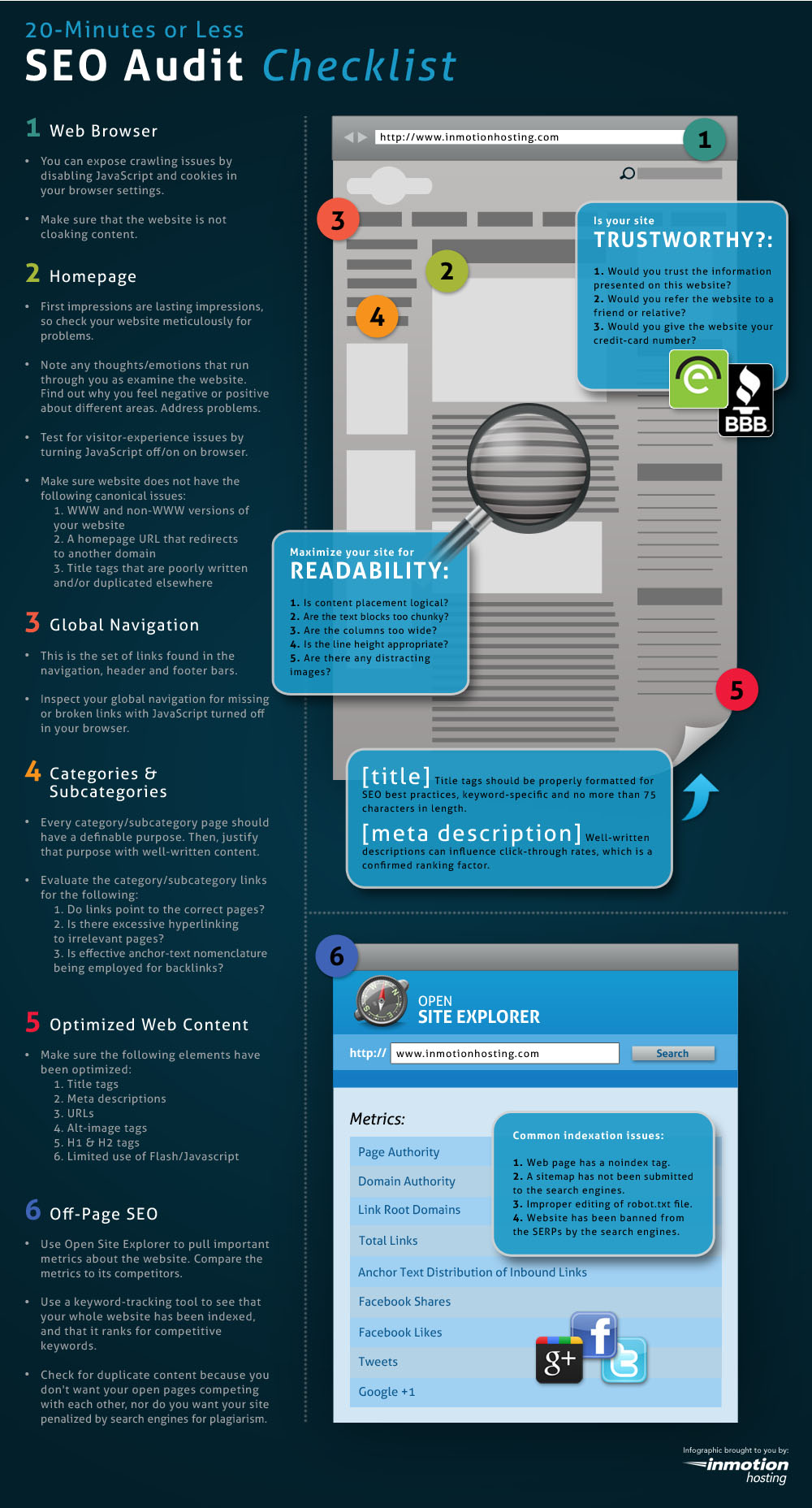
Getting Traffic 107 - The Mega SEO Resource Guide

Ok, so you probably know what SEO is (Search Engine Optimization) and why it's important (you do want higher page rankings right?).  What I have for you today is a list of resources and articles that you'll want to have if you're learning about SEO and how to optimize your blog.  Check it out, and don't forget to subscribe for more great resources!

Do You Speak SEO?  - SEO.com's guide to SEO ling that you need to know.

5 Ways to SEO your posts  - Learn how to optimize your blog posts!

Link Exchange: Good vs. Evil - Learn why black hat SEO like a link exchange is a bad idea!

10 Types of Unnatural Link Building and 10 Alternatives

What Is Black Hat SEO? - About.com

50 SEO Tips to Get Good Ranking in Search Engines - From Social Web Q and A

Google PR and SERP Checker - Check your page rank and Search Engine Ranking Positions

Click image below to enlarge.

The rest of the above audit guide can be found HERE.

Do you have more great SEO resources for us?  Drop them in a comment below.

Saturday, June 9, 2012

Monetizing 107 - Beware of Scams

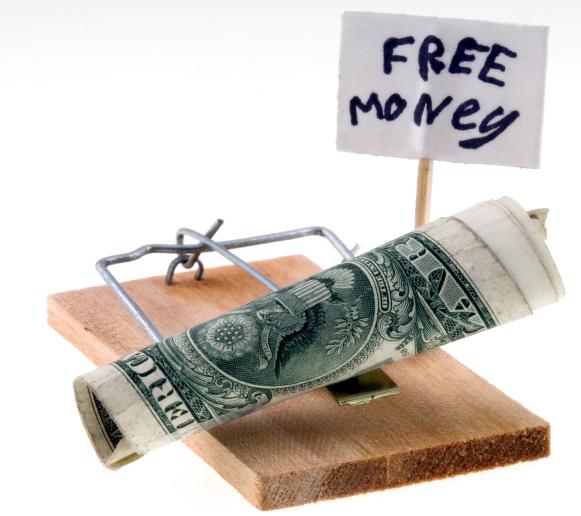
If you go to Google and type in anything along the lines of: "Make money online", or "make fast cash", you're likely to come up with thousands of pages of scams trying to take your hard earned money, steal your identity, or just make you frustrated by wasting your valuable time.  Today I want to talk to you about avoiding scams.  Maybe we can get one up on those people who think it's OK to steal other people's money as a means of income.

First let's talk about what to look for in a scam:

1) Most people who want you to pay for their 'secret way to make money online' are scammers.  They will take your money and run, or take your money and then give you the same tips you can get for free online from sites like Hot Shot Blogger, or other similar sites.

It's best to avoid people who want to take your money for their e-book, or video series, or for any other strategy they claim will make you money.  Remember, in the real world you don't have to pay money to get a job.

2) Take a critical look at the websites you're viewing.
- Are they asking for money?
- Is the page all white with no pages other than the one you're on?  
- Do the testimonials and information go on and on all the way down the page about how great their program is for making money?  
- Does it look fake?  
- Are there pop-ups that ask you repeatedly 'Are you sure you want to back out,' or something similar?
- Does it seem 'too good to be true?' 

These are all things you need to be thinking about.  Most legitimate websites are in depth websites, not just one page full of rambling with no real information.  If you have to pay to get the information, or give them your credit card or other personal info, then back out immediately and be thankful you weren't tricked.

3) Know who runs the company.  Is this company that is promising you money run by another reputable company, or by someone unknown?  Take Prizes.org for example.  I came across it a few days ago, and wondered if they were legit.  Then I saw and verified that they are run by Google, a company I do trust.  After looking at how money is awarded and who runs it, I decided that I did trust this website.  You can look on Alexa for some of this information as well as reviews.  Something you might not know is that you can install the Alexa toolbar on your browser and from there it's very easy to get info about a website you're viewing, and also to leave reviews to help others realize if it is a fraudulent or legitimate website.

A key way to avoid scams is identifying them by A) The way they look, and B) What they want from you, as we talked about above.  But what are some of the other ways we can identify harmful scams on the web?

1) Check online.  If you're really not sure if something is for real or not, you can go to Google and type in: Is _________ a scam?  Or simply the website name and then scam.  For instance: you could type in zazzle.com scam?  Or is zazzle a scam?  If zazzle is a legitimate website (which it is) then you are not likely to find anything online about them being a scam.  Most people will report scams to the big scam websites online and google will help you find those entries into the scam databases.  Occasionally you will come up with complaints against a website with the BBB (Better Business Bureau) about a website or company, but you can look at the comments and take them for what they are, deciding if there is anything legitimate to the complaints.  The BBB allows companies to rectify any wrongdoings with the complainers, and lets consumers know if this has taken place.

2)  Brows the internet with your anti-virus software turned on.  There's been a number of times when Avast! Anti-virus has popped up on my screen telling me I've just entered a website with viruses on it.  I can then back out with no issues to my computer and nobody installing a trojan or something else that will try to steal my credit card info the next time I use it to buy something online.  If you don't have a good anti-virus software, I recommend Avast which you can find on CNET.  It's free, and trustworthy.

This method is not so much about detecting scams as it is about keeping you safe.  A lot of websites with viruses out there aren't even fraudulent, but have sold advertising to fraudulent people who are trying to steal your personal information.


What have been some of your experiences with online scams?  What are some ways you avoid getting scammed?  Let us know in a comment below, and don't forget to follow for more great tips and info about building your blog!

Saturday, May 12, 2012

Monetizing 103 - Amazon Associates

So what exactly is Amazon Associates, and how can it help me make money with my blog?  Well if you've ever heard the adage that you can't put all your eggs in one basket, then you'll be familiar with the concept of spreading your earnings around.  Yes, Adsense can make you some money, but there are other ways that are equally as important, and just as easy to use!  Enter Amazon Associates, the tool that lets you advertise specific products on your blog, and then gives you a cut of the profits when someone buys that product you've shown them.

So how do we use Amazon Associates?  First you'll need to have an Amazon account, and you'll also need to sign up for an associates account HERE.

Ok, so you've got an associates account, and let's say you've got a video game review blog.  Perhaps you've just written a post reviewing The New Super Mario Bros for Wii, and you've given it an excellent review.  This would be a great time to put a link to the game for sale on Amazon at the end of your post since you're basically recommending that people buy this game.

1) Log in to your Amazon account.

2) Find the game (or product) you'd like to link to.

3) At the top of your Amazon page there should be a gray associates toolbar with a link on the left that says, "Link to this page."  Click it.


4) When you click on "Link to this page" it should bring up a window like the one below.  You can customize the way the image will look and act with this box.  I generally set the color of the link to whatever my blog uses (in this case orange), I use no border, and I have it open the link in a new window so that in one window they are staying on my blog.

5) When you're done, you'll want to select and copy the code at the bottom of this box.


6) Then go back to your blog post, click on the "Edit HTML" tab if you're in Blogger, and paste the code in. Then you can go back to the "Compose" Tab to view the way it will look.

7) When all is said and done, you'll have an image and link to the product that looks like this:


8) When people click on your little widget you've just created from Amazon Associates, and buy the product, you get a percent.  All in all a great little tool that is very easy to use to make some money on your blog.


Don't forget to comment and subscribe, for more great tips and tutorials for building your blog!

Sunday, September 25, 2011

Starting A Blog 101 - Part Two Signing Up

Check out this video for a basic demo of how to sign up for Blogger and get your blog started!

Thursday, September 22, 2011

Privacy Policy

Privacy Policy for http://hotshotblogger.blogspot.com/
The privacy of our visitors to http://hotshotblogger.blogspot.com/ is important to us. 
At http://hotshotblogger.blogspot.com/, we recognize that privacy of your personal information is important. Here is information on what types of personal information we receive and collect when you use and visit http://hotshotblogger.blogspot.com/, and how we safeguard your information.  We never sell your personal information to third parties.
Log Files
As with most other websites, we collect and use the data contained in log files.  The information in the log files include  your IP (internet protocol) address, your ISP (internet service provider, such as AOL or Shaw Cable), the browser you used to visit our site (such as Internet Explorer or Firefox), the time you visited our site and which pages you visited throughout our site.
Cookies and Web Beacons
We do use cookies to store information, such as your personal preferences when you visit our site.  This could include only showing you a popup once in your visit, or the ability to login to some of our features, such as forums.
We also use third party advertisements on http://hotshotblogger.blogspot.com/ to support our site.  Some of these advertisers may use technology such as cookies and web beacons when they advertise on our site, which will also send these advertisers (such as Google through the Google AdSense program) information including your IP address, your ISP , the browser you used to visit our site, and in some cases, whether you have Flash installed.  This is generally used for geotargeting purposes (showing New York real estate ads to someone in New York, for example) or showing certain ads based on specific sites visited (such as showing cooking ads to someone who frequents cooking sites).
You can chose to disable or selectively turn off our cookies or third-party cookies in your browser settings, or by managing preferences in programs such as Norton Internet Security.  However, this can affect how you are able to interact with our site as well as other websites.  This could include the inability to login to services or programs, such as logging into forums or accounts.   
* Google, as a third party vendor, uses cookies to serve ads on your site.
* Google’s use of the DART cookie enables it to serve ads to your users based on their visit to your sites and other sites on the Internet.
* Users may opt out of the use of the DART cookie by visiting the Google ad and content network privacy policy.
AdSense Privacy Policy Provided by JenSense

Twitter Delicious Facebook Digg Stumbleupon Favorites More